Cara Menggandakan Chip Poker Facebook
Karena ternyata sangat mudah mendapatkan CHIPS POKER YANG BERLIPAT GANDA, tentunya jika kita tau cara yg tepat.
Dan sama sekali tidak memerlukan software…!!
 Dapat di bilang cara ini adalah salah satu cara yg harus cepat kita pakai.
karena ini sebuah celah dalam system Zynga Poker Texas Holdem Facebook dan karena adanya kerjasama yang unik antara Zynga dengan Yahoo!.
Cukup rumit untuk menerangkan cara kerja system ini disini, karena kita diharuskan mengerti system dan bahasa program game online.
Tapi tenang saja, berkat jasa kawan2 kita di komunitas blackhat di beberapa kota-kota besar di Indonesia, Malaysia, dan Singapore, beberapa sudah berbaik hati memberikan ilmu ini untuk para pengemar poker di facebook, walaupun saya mendapatkan ini bukan secara cuma-cuma, tetapi dengan "memohon" dan memakan waktu yang tidak sebentar untuk berkenalan lebih dekat dengan mereka, hanya agar diberikan SCRIP dan CARA yang akan saya bahas disini secara GRATIS!!!! ;)
Bagaimana??? Tertarik???
-----------------------------------
Baiklah, kita mulai saja..
Sebelumnya saya akan sedikit menjelaskan cara kerja systemnya.
Dalam permainan Texas Holdem Poker Facebook, setiap gerakan dalam pertandingan terekam sebagai perintah khusus ke system Texas Holdem Poker Facebook tersebut.
Perintah itu yang membuat system bereaksi sesuai fungsinya seperti membagi kartu, mengurangi atau menambah nilai chip para pemain dll.
Ternyata dari yang saya dapat tadi, perintah tersebut dapat kita akali dgn sebuah EMAIL KHUSUS (Dengan Scrip) ke dalam system Texas Holdem Poker Facebook tersebut.
-----------------------------------
Ok.. sekarang kita mulai prakteknya..
Ikuti langkah-langkahnya satu per satu (baca ulang penjelasan diatas jika belum jelas) karena jika langkah-langkahnya tidak diikuti tahap per tahap, maka akan membuat perintah Scrip menjadi tidak berfungsi. Dan kita harus mengulanginya lagi dari awal.
Tapi INGAT!!! pengulangan hanya dapat dilakukan sebanyak 10x. Jika sudah mencapai batas maksimum pengulangan, maka Anda diperbolehkan lagi mengulangnya dalam 24 jam kedepan, terhitung dari pengulangan terakhir.
LANGKAH-LANGKAHNYA:
1.LOGIN FACEBOOK dan masuk ke Texas Holdem Poker. Tapi minimal chip anda 1M. Ikuti sebuah pertandingan, taruhannya terserah Anda. Anda HARUS melakukan call 1x, lalu SEBELUM (INGAT!!! SEBELUM) 3 kartu dibagi terbuka dan diletakkan ditengah meja dan sebelum pemasangan taruhan yang kedua, maka CEPATLAH keluar dari arena dengan mengklik salah satu link di menunya Facebook. Misalnya menu Home/Beranda. Ingat, Home/beranda-nya Facebook lho ya, bukan Home-nya Poker.
2.Saat halaman home/beranda Facebook telah terbuka, logout dari Facebook Anda.
3.Login ke email yang Anda gunakan untuk bermain Texas Holdem Poker di Facebook. Ingat..!! Account email Anda harus yang barusan Anda logout di Facebook tadi agar cara ini bisa bekerja.
4.Jika sudah masuk ke account email Anda, lalu Compose/Tulislah sebuah email baru yang ditujukan kepada system Texas Hodem Poker Facebook dgn alamat :
zynga_retrieve@yahoo.com
Pada baris SUBJECT masukkan/ketik kalimat :
lalu pada baris pertama isi mail, Anda tuliskan scrip berikut ini :
relreq&$chipamount/winlastplayed=^^YOUR EMAIL^^log\\YOUR PASSWORD^^log\\chip=true; cgi-bin/$set714&
Ket:
1.CHIPAMOUNT : Banyaknya chips Anda terakhir kali Anda main Texas Holdem Poker. Ini sekaligus sebagai pengali dua chip poker Anda.
2.YOUR EMAIL : Email yang Anda gunakan untuk bermain Texas Holdem Poker.
3.YOUR PASSWORD : Password yang Anda gunakan untuk bermain Texas Holdem Poker.
Ketiga syarat inilah yang akan menentukan berhasil tidaknya usaha Anda, karena sever Zynga bekerja sama secara unik dengan Yahoo! dan keduanya akan memvalidasi secara otomatis, melakukan login untuk mengkonfirmasi valid atau tidaknya email dan password Anda.
Dengan kata lain kedua server ini akan meng-extract password dari email yang Anda masukan dan akan memprosesnya secara randomize.
contoh :
relreq&$1000000/winlastplayed=^^mahadewi@plasa.com^^log \\123456^^log\\chip=true;cgi-bin/$set714&
send...
5.tetap di account email Anda dan tunggu sampai masuk sebuah pesan dari Zynga dengan pesan "TRUE" Jika memang benar valid atau dengan pesan "FALSE" jika tidak valid.
(lamanya pesan ini terkirim ke inbox Anda paling lambat 2x24 jam.
6.login ke facebook Anda (pastikan setelah mendapat pesan true tersebut) agar tidak terjadi crash perintah scrip.
Lalu Anda bisa lihat penambahan chips Anda sesuai dengan CHIPAMOUNT yang Anda masukkan tadi.
NB:
Untuk kesenangan kita bersama, jgn sampai system Zynga Texas Holdem Poker Facebook menutup celah ini dan biar kawan2 yg lain dapat menikmatinya juga.
1.Sebuah account jgn terlalu sering menggunakan cara seperti ini dalam waktu dekat. Maksimal seminggu sekali.
2.Sesuaikan jumlah kemenangan Anda dengan nilai chip Anda saat mulai main.
ok..selamat mendapatkan chips gratis...
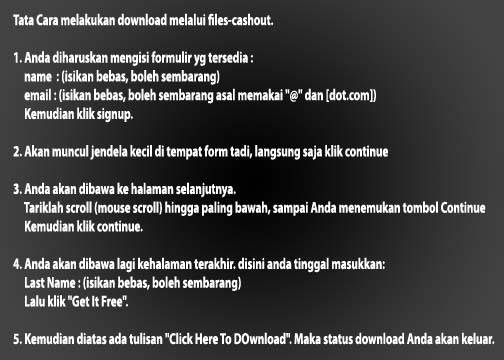
Cara Mengetahui Posisi Seseorang Via Phone Guardian
 , tapi kok dipikir2 ternyata trik ini bisa dipakai untuk mengetahui posisi orang lain ( orang2 dekat kita ) melalui GPS phone ( nokia s60v3 + s60v5).
1> hape s60v3 ato s60v5 yang memiliki gps
2> symbian guru phone guardian 3 (aplikasi anti maling)
3> google maps ( terserah mau yg mobile atau lewat browser komputer)
Action:
1> install phone guardian 3 nya di hape target, sebaiknya diinstal dengan opsi
tanpa icon, jadi full stealth
2> setting phone guardiannya
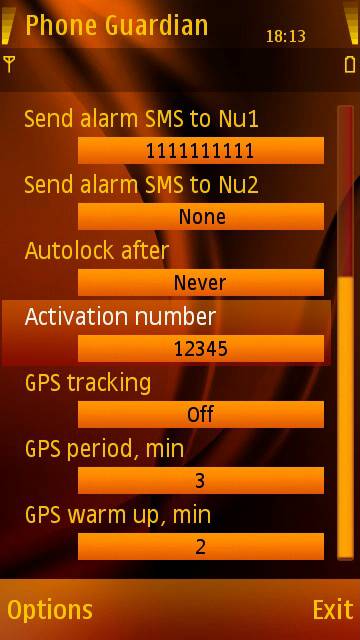
Pertama set guardiannya ke : ON.
isi "send alarm sms to no1" dengan nomer telepon kita
set gps trackingnya off ( gps akan kita aktifkan lewat sms remote )
set gps warmup, dan gps periodnya ke nilai paling kecil
3> setelah seting selesai restart tuh hape, dan kembalikan ke pemiliknya
Berikutnya bagian tracking, atawa pelacaknya:
1> kirim sms ke hape target, commandnya ":g: password" (tanpa tanda petik,
tanpa spasi)
password disini adalah password phone guardiannya
perintah "g" adalah untuk mengaktifkan gps
2> tunggu selang beberapa menit (tergantung setting gps period) yang disettingkan tadinya. Setting gps period ini menentukan tiap berapa lama gps menentukan posisi terbaru
3> setelah waktunya mencukupi kirim sms ke target isinya ":i: password"
command ini akan meminta phone guardian mengirimkan data lokasi hape
saat ini lengkap dengan posisi gpsnya
selang beberapa detik kemudian sms masuk ke hape kita
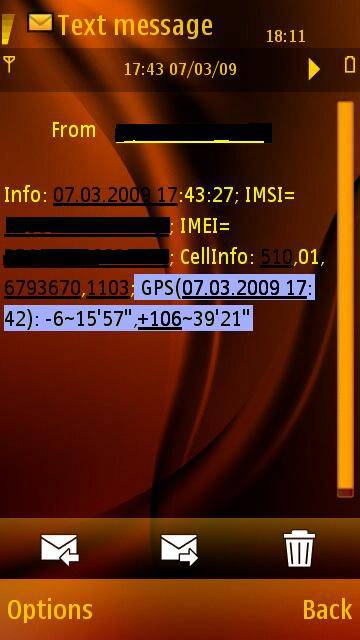
4> jangan lupa mematikan gps di hape target dengan isi sms ":t: password"
5> step terakhir, buka google maps di browser ( maps.google.com) atau via
google maps yang udah diinstal di hape,
pilih search, masukkan posisi gps, lalu search maps
perlu diingat phone guardian mengirimkan format {-x~y'z",+x~y'z"}
tanda ~ harus diganti dengan spasi
6> Posisi target terlihat.....
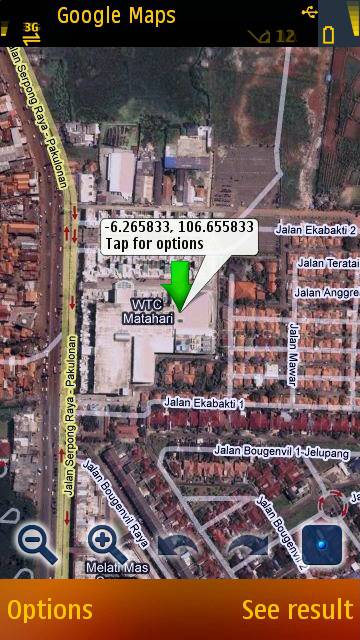
setiap sms command yang kita kirim ke hape target, akan langsung didelete oleh aplikasi phone guardian, jadi target tidak akan menemukan sms yang kita kirim tersebut di inboxnya.
dengan trik ini kita bisa mengetahui posisi orang2 yang dekat dengan kita, paling tidak kita udah punya persiapan seandainya hape kita hilang.
Gimana??? Pengen nyoba???
Pengen tau Hape apa aja yg bs dipake???
Nihh... klik >>> DISINI <<< untuk liat spesifikasi aplikasi itu, skaligus kalo mau downloadnya.
Cara Hack Telepon PABX Panasonic KX -T7730

Setiap kita ingin menelpon keluar kita harus menghubungi (baca: ngemis) dulu operator agar dihubungkan ke nomor yang kita tuju. Belum lagi kalau operatornya cerewet, nanya-nanya maksud dan tujuan kita nelpon ke nomor telepon yang dimaksud.
Kebetulan kantorku memasang sistem PABX dengan pesawat Panasonic KX-T7730. Nah, tanpa sengaja aku menemukan sebuah celah yang memungkinkan untuk menelpon seenak perut ke nomor yang kita tuju tanpa melalui operator. Setiap orang yang pernah memakai sistem PABX pasti tahu bahwa untuk mengambil alih panggilan dari pesawat lain kita akan diberi kode khusus, misalnya “#40”. Sehingga apabila ada pesawat lain yang berbunyi dan kita ingin mengangkat panggilan tersebut dari telepon di meja kita, cukup pijit kode ”#40” dari pesawat telepon kita, dan panggilanpun akan langsung diambil alih pesawat kita. (Kita...? Loe aza ama Kebo...! he..he..)
Satu lagi, setiap orang yang pernah memakai telpon PABX pasti akan tahu bedanya antara bunyi nada sambung PABX dan nada sambung Telkom (beda donk...! coba aja...).
Oke deh... biar nggak bertele-tele, marilah kita langsung praktekkan. Berikut ini beberapa hal yang harus kita perhatikan:
- Kita pastikan kalau PABX kantor kita adalah Panasonic KX-T7730 (Soalnya trik ini belum pernah digunakan di PABX jenis lain dan di TEMPAT LAIN). Tapi kalaupun tipe atau merknya ngga sama, cuek aja... siapa tahu bug ini jalan juga di PABX tsb (namanya juga usaha...).
- Kita mesti tahu nomor telpon kantor kita. Biasanya dalam satu sistem PABX akan terdiri dari beberapa nomor telepon, pilih aja salah satunya, kalo gagal coba lagi ke nomor yang lain.
- Kita mesti punya HP yang masih bisa nge-misscall ke tujuan PSTN lokal, gunanya untuk nge-misscall nomor kantor kita. Kalo ngga punya HP minjem aja dulu ke temen (Anyway... modal dikit napa...? he..he..)
- Kita mesti tahu kode pengambil-alihan panggilan dari pesawat lain ke pesawat kita (kalau dikantorku kodenya “#40”).
Berikut adalah cara kerjanya:
- Pakai HP kita untuk nge-misscall telpon kantor kita. Apabila sudah nyambung, selain di HP ada nada tunggu, pasti di ruangan operator akan terdengar nada panggil (ringtone). Kecuali kalau pesawat telepon kita berada di ruangan/gedung yang berbeda, pedoman kita hanya pada nada tunggu di HP kita saja.
- Begitu nada tunggu sudah terdengar (max.2 kali bunyi agar tidak keburu diangkat orang atau sang operator telpon), segera putuskan panggilan dari HP. Begitu sambungan terputus, anda mempunyai tenggang waktu sekitar 3 – 5 detik untuk menyimpan HP anda dan segera mengangkat pesawat telpon anda dan memijit kode pengambilalihan panggilan.
- Apabila timingnya tepat maka akan terdengar nada “niiit...!” dan Wallaaa.... Nada sambung telkom pun akan terdengar merdu. CATATAN: bila langkah ini dilakukan terlalu cepat, anda hanya akan mendapatkan nada putus dari HP kita (tut...tut...tut...) setelah nada “Niiiiit....” tersebut.
- Apabila nada sambung sudah terdengar, anda tinggal memijit nomor telpon tujuan kita dan silakan bicara sepuasnya.
KENAPA BEGITU....?
Dari analisa yang saya lakukan, ternyata ada delay antara putusnya sambungan HP dengan matinya nada deringl PABX. Ini terbukti, ketika saya melakukan misscall dari HP saya, nada dering PABX masih saja berbunyi walaupun sambungan dari HP saya sudah terputus. Dengan kata lain, walaupun sambungan sudah putus, namun untuk beberapa saat PABX masih membuka gerbangnya bagi siapa saja yang ingin mengabil alih panggilan tersebut. Sehingga ketika pada saat delay itu ada salah satu pesawat client yang melakukan pengambil alihan panggilan maka central PABX akan memberikan akses penuh line telpon kantor terhadap pesawat client tsb. Akibatnya, line telpon yang sudah bebas tadi akan bisa digunakan secara remote dari pesawat tersebut.
Kejadian ini mungkin saja terjadi karena kelemahan pada penyetingan delay time dari putusnya panggilan dan matinya service pengalihan panggilan. Kalau memang setting-an nya terdapat pada pesawat Panasonic KX-T7730 maka kelemahan ini akan dapat segera diperbaiki. Tapi kalau memang tidak ada, maka ini akan menjadi bug permanen pada pesawat PABX tipe tersebut, dan boleh jadi hal ini terjadi pada pesawat PABX tipe dan merk yang lainnya.
Hanya untuk pembelajaran dan sekedar pengetahuan lohh yahh?!!

Next artikel silahkan di tunggu Secara sedang dalam penelitian.. hehehe...
Dollar Gratis Dari PAYPAL dan FACEBOOK!!
 PAYPAL Sekarang berkerja sama dengan facebook dan akan membagi-bagikan Dollar gratis bagi siapa saja yg ikut berpartisipasi dalam program ini.
Tentu saja dengan ketentuan-ketentuan yang berlaku.
Program ini memungkinkan kita mendapatkan sampai dengan $100!
Wow!! Sungguh angka yang menarik bukan??
Program ini bernama PAYPAL WISHLIST, sebuah aplikasi PAYPAL yang berkerja sama dengan situs jeraring sosial yang lagi booming saat ini, yaitu Facebook.
QUESTION and ANSWER
---------------------------
Q: Apakah ini SCAM?
A: Bukan! Karena ini Program kerjasama antara Facebook dan Paypal, karena mereka adalah situs yang sangat populer, maka mereka tidak mungkin memberikan SCAM, sebab popularitasnya akan hancur jika mereka begitu.
Q: Bagaimana cara kerjanya?
A: Cukup mudah, Anda hanya diharuskan untuk mengajak teman-teman Anda supaya mengikuti program GRATIS ini.
Q: Caranya?
A: Dibawah ini akan saya jelaskan bagaimana dan ketentuan apa saja yang harus Anda miliki.
Q: Apa yang akan saya dapat?
A: Anda akan mendapat Dollar demi Dollar, jika ada orang yang mendaftar melalui referral Anda.
Q: Berapa Banyak Dollar yang akan saya dapat?
A: Hanya dengan Anda mendaftarkan diri saja di program ini, maka Anda otomatis akan mendapatkan $1 langsung.
Dan Anda akan mendapatkan $1 lagi tiap 1 orang yang mendaftar melalui referral Anda.
Q: Berapa Minimun Payout-nya?
A: Paypal membuat min. payout-nya sebesar $9.
Q: Kapan saya mendapatkan uang itu?
A: Pembayaran, baru dapat diterima pada tanggal 28 Februari 2010.
Jadi masih banyak waktu kan untuk Anda mengajak teman-teman Anda bergabung di program ini, dan tentu saja, semakin banyak teman-teman Anda yang bergabung, maka semakin besar pula yang akan Anda dapatkan.
Bagaimana?? Anda tertarik??
Ok. Kita mulai saja yah?
KETENTUAN
--------------
1. Berumur minimal 18 tahun dan alamat pada akun Paypal terdaftar di India, Thailand, Malaysia, Korea, Vietnam, Philippines, Indonesia, atau Singapore.
2. Akun Paypal harus dalam Good Standing selama masa promosi program. Dalam arti tidak dalam keadaan di-hold atau di-suspend.
Jika Anda belum memiliki PAYPAL, silahkan klik DISINI untuk mendaftar.
3. Membuat daftar Paypal Wishlist dan mempromosikannya.
4. Batas maximal penghasilan adalah $100
5. Penghasilan baru dapat diterima tanggal 28 Februari 2010.
CARA DAFTAR (JOIN)
---------------------------
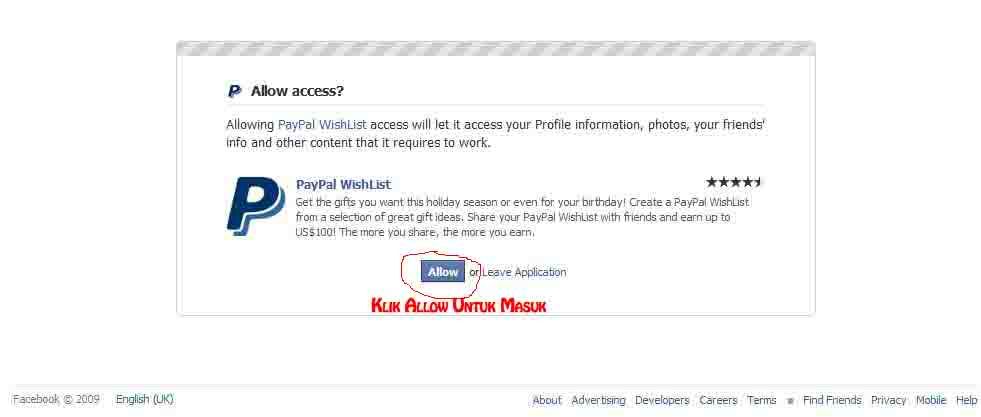
1. Login ke Facebook Anda
2. Trus klik DISINI
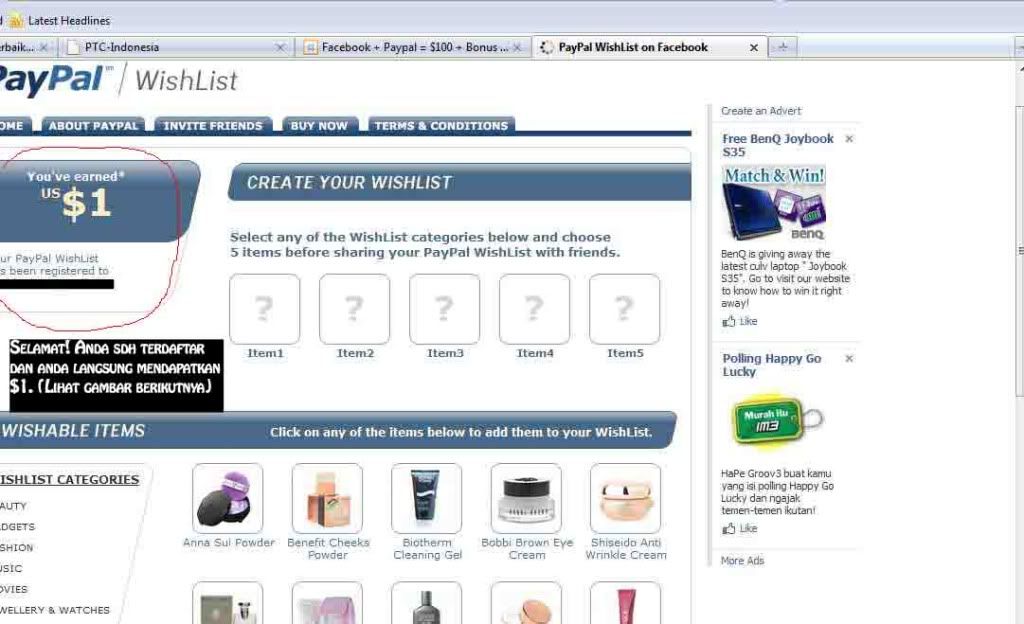
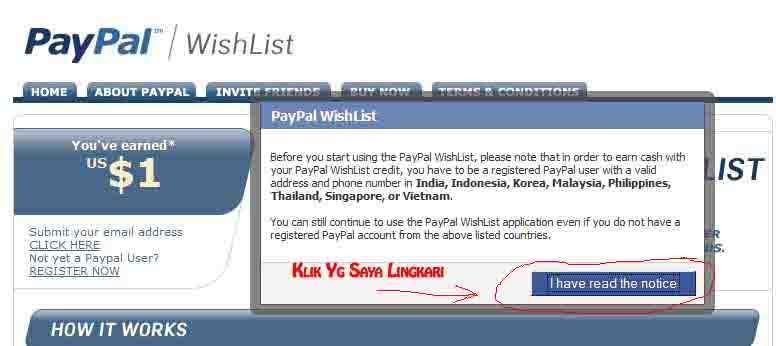
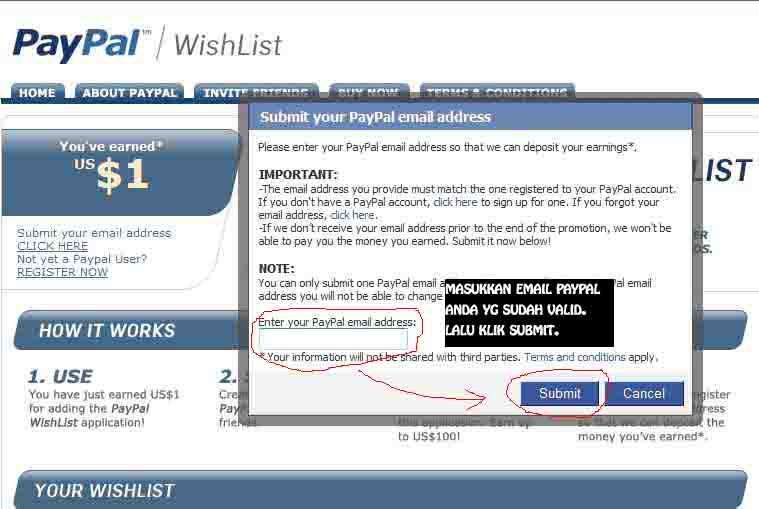
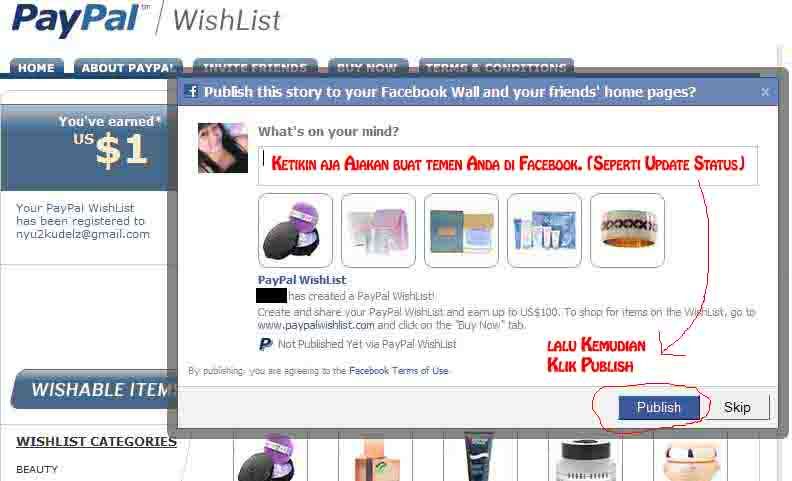
3. Masukkan alamat email Paypal yang valid dan sudah terverifikasi melalui menu yang ada di sebelah kiri atas. (Lihat Gambar dibawah untuk lebih jelasnya)
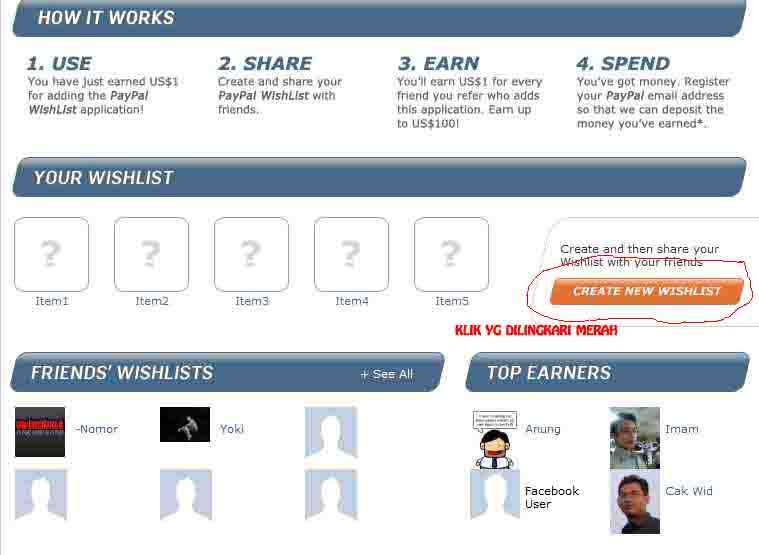
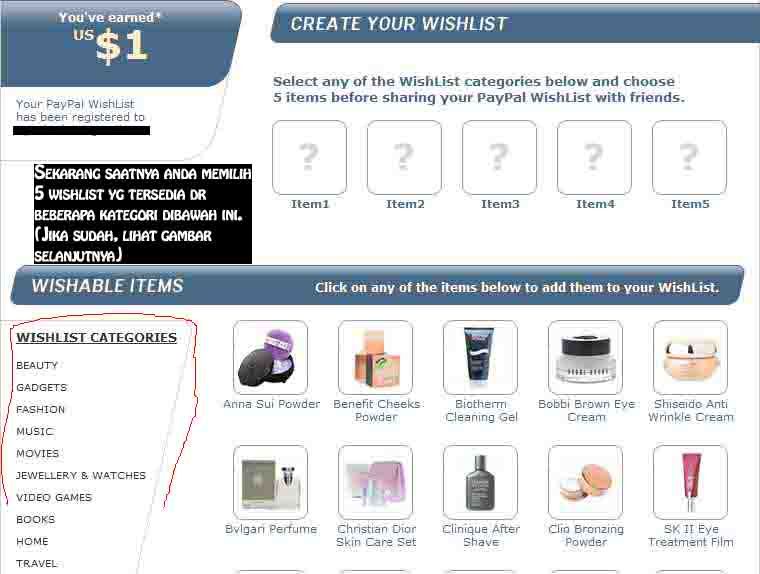
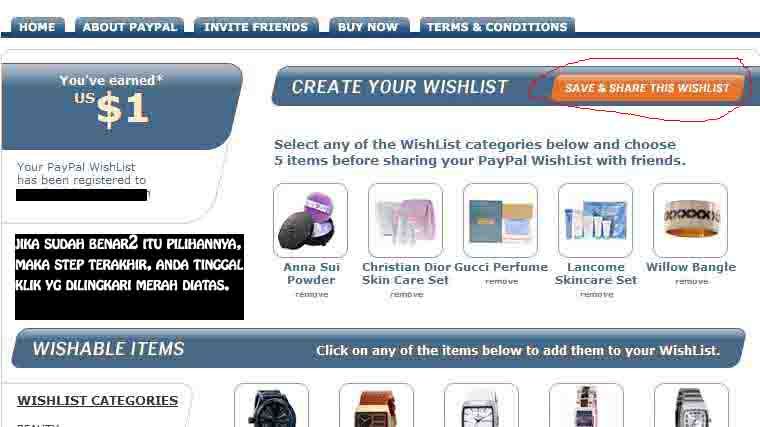
4. Buat wishlist dengan menekan tombol Create Wishlist. Setelah selesai, dapat men-share program Paypal Wishlist ini ke teman-teman yang lain di Facebook. (Lihat Gambar dibawah untuk lebih jelasnya)
GAMBAR
------------
Cat: Klik Gambar Untuk Memperbesar.
 ----
---- ---
--- ---
--- ---
--- ---
--- ---
--- ---
--- ---
--- ---
---SELESAI
---
--------------------
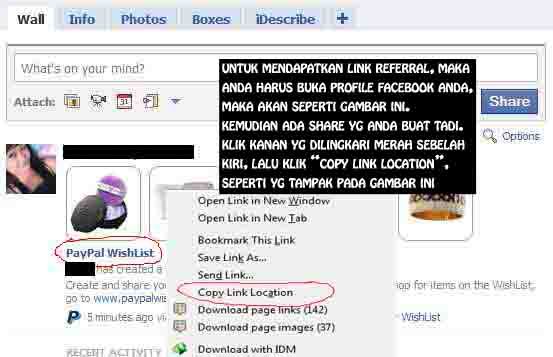
Untuk mendapatkan Link Referral Anda, maka Anda masuk ke halaman profile pada Facebook Anda.
Disana hasil share yg sudah Anda buat akan tertera seperti pada gambar dibawah ini.
Kemudian, klik kanan PAYPAL WISHLIST, dan pilih Copy Link Location.
Ingat, paste lah di notepad link yang sudah Anda copy tadi. Simpanlah.
Karena PAYPAL WISHLIST ini tidak memberikan Link Referral Anda, maka saya mensiasatinya seperti gambar dibawah ini.
 ---
---Rapid Share Premium Account Generator
Program ini memungkinkan Anda untuk mendapatkan account dan password Rapid Share untuk masuk ke premium zone.
Nama software ini adalah Rapid Share Premium Account Generator.
Yang perlu Anda lakukan hanya mengeksekusi program ini, dan Anda tinggal mengklik generate account.
(Lihat gambar dibawah ini)
Lalu dengan otomatis program ini akan memunculkan account id dan passwordnya.
Tapi ingat, sebelum Anda memasukkan Account ID dan Passwordnya, sebaiknya Anda masuk melalui proxy dengan menggunakan Proxy Finder atau ChangeIP.
Sebab Rapid Share bukan situs sembarangan yg dengan sangat mudah bisa ditembus oleh para hacker2 pemula, karena Rapid Share memakai "Anti-Fraud Protection", dan ketika Anda login ke Premium account, maka Rapid Share akan mendeteksi IP Anda dan akan mengklaimnya.
Ingat!!! USE THIS AT YOUR OWN RISK!!
Saya disini hanya memberikan cara2nya saja dan hanya untuk sebagai bahan pembicaraan, bukan bermaksud untuk mengajarkan menjadi hacker yg tidak bertanggung jawab.
Semuanya ada ditangan Anda, bagaimana Anda menyingkapinya??
Balik lagi ke diri Anda sendiri..
------------------------------------------------
Klik Disini untuk download Rapid Share Premium Account Generator
Klik Disini untuk download ChangeIP
Klik Disini untuk download Proxy Finder
RapidShare Download Manager!!!

Apakah Anda ingin mendownload file-file dari RapidShare (RS)??
Terganggu dengan waktu yg harus kita tunggu sebelum mendownload file-file itu??
Jangan takut, sekarang ada program baru yg bisa mendownload file-file dari RS, namanya RS Download Manager.
Caranya mirip dengan IDM atau DAP.
Cukup dengan memasukkan alamat URL file dari RS, maka dengan otomatis program ini akan mendownloadnya, tanpa Anda harus menunggu klik selanjutnya untuk mendownload file dari RS.
Tinggal install-kan saja program ini di PC Anda, tapi PC Anda harus diinstal program Java For Desktop terlebih dahulu.
Sebab program RS Download Manager ini membutuhkan Java untuk bisa bekerja di PC Anda.
Setetlah Java For Desktop Anda terinstal, maka instalkan langsung RS DM ini.
Jalankan program ini.

Anda tinggal mencari URL file-file apa saja yg Anda butuhkan di RS account, Copas URL-nya, dan otomatis program RS DM ini akan mem-paste-nya kedalam list URL yg akan didownload.

Klik start Download Untuk memulai program ini mendownloadnya.
Sekarang yg Anda lakukan tinggal duduk diam atau browsing, ataupun melihat-lihat postingan yang ada di blog saya ini. 

Setelah program ini selesai mendownload file yg Anda inginkan, akan terdengar suara "ding" dari program ini, bahwa file Anda sudah berada di Harddisk Anda.
Selesai, dan tanpa Anda harus menunggu detik demi detik untuk klik selanjutnya sebelum file Anda dapat didownload dari RS.
Download "RapidShare DM" Disini.
Download "Java For Desktop" Disini.
Atau mungkin Anda ingin coba program RapidShare Direct Download???
Klik Disini untuk mendapatkannya.
How To Install Vodafovne K3760 For Win 7
I recently installed the RTM of Windows 7 x64 onto my laptop… Impressed with how it picked up all my hardware and “just worked” I assumed all other drivers and hardware wasn’t going to be a problem… I decided to use it as my daily work laptop…
First day of use, I decided to use the web using my Vodafone Mobile Connect K3760 3g stick (Also goes by the name of Option K3760) on a customer site… The Vodafone Mobile Connect Lite software installed without a hitch… When I tried to connect, it didn’t detect the modem at all and showed “No device” the K3760 was not recognized by Windows 7 x64…

I re-booted the laptop and messed around un-plugging the device, re-installing the software in all sorts of combinations but to no avail… I started hunting around Device Manager and noticed the following which seemed really odd…

The Vodafone K3760 USB modem was shown under DVD/CD-ROM drives in Device Manager as a ZCOption HSUPA Modem USB Device, when it clearly isn’t a CD-ROM drive! As the K3760 has a Micro-SD card slot it looked like it was being detected as just a storage device and the modem hardware was not getting a look in…
In Device Manager under USB Devices there was a USB Mass Storage device listed, when I didn’t have any USB sticks attached or external drives… Hmmm…
The FIX:
With the Vodafone K3760 attached to your system, open Device Manager and browse to the Universal Serial Bus Controllers section and locate the USB Mass Storage Device highlighted below, right click it and disable the device, as shown below… (NOTE: Make sure you don’t have any other Mass Storage Devices connected at the time, or you could disable the wrong one!)

Right click the now disabled USB Mass Storage Device and select Update Driver Software when prompted choose Browse my computer for driver software and then select Let me pick from a list of device drivers on my computer.

It will then show two compatible drivers as shown below:

Highlight GlobeTrotter G141x and click Next. It will run through the driver installation and then once complete click Continue.

Your driver should now be installed and you should now be able to see and manage the USB Modem in the Vodafone Mobile Connect Lite software…
To confirm everything is OK, check in Device Manager that it is now listed correctly, it should appear in Network Adaptors as “GlobeTrotter G141x – Network Interface”.

Open the Vodafone Mobile Connect Lite software and click on the Manage Devices tab on the left hand side… You should now see you Modem as an application interface and set as default.

You should now be able to connect up to the net with your USB modem!…
I’d love to hear from you if this has sorted your problem or if you have any further questions… So feel free to leave comments below…How Can A Website Benefit Your Business?
 1. Why should you have a website?
In order to succeed in today's world, you must have an Internet presence. More and more people log on to the internet everyday; there are billions of users world-wide and there are several reasons why one needs a web site. A website is a powerful first impression. Placing your business on the World Wide Web, gives your business the potential for global exposure, no matter the size of your business – be it large or small; singular or multi-national. To have your own website gives your business invaluable advantages, which is illustrated in the answer to the next question, viz-a-viz:
2. How can a website be useful?
Website help you leverage web services for streamlining data transfer to and from your organization.
There are myriad reasons for - How a website can be useful and why you should bring your business online? Some of them are, briefly, mentioned below:
a. Enhanced customer convenience
Your business concern can be more easily and quickly reached, every time a potential or an existing client searches for relevant businesses, products and services over the Internet. Your customers can always keep in touch with you and your business, just by knowing your web site address.
b. Greater reachability of your business profile:
Your business profile can be accessible from anywhere in the world. No other ad medium provides such global coverage. You need not depend on phone book entry or restricted yellow pages and newspaper ad presentations, any longer.
c. Greater possibilities for promoting your business portfolio:
People will not buy your products or services unless they know that they actually exist. You can tell your potential audience much more through a WEBSITE, than you could possibly do via any print advertisements, Yellow Pages listings, or TV/radio commercials. There are no limitations as far as space, time, nationality and residency are concerned. You can say as many things as you want, to as many people as you wish. And your business representation can be as resourceful as is the Internet itself.
d. Efficient low-cost advertising:
Your customers will always be able to obtain thorough up-to-date information about your services or products. Instead of having to rely on randomly aired TV or radio commercials, they can simply browse through your website whenever they like.
e. 24/7 availability:
Website is available to you 24 hours a day, 7 days a week, 365 days a year. It will be your hardest working employee, never getting sick, or taking a holiday. And you can rest assured that your website is always there for you – to answer your customers’ questions or to collect their feedback on your behalf.
f. Time-saving:
Prospective clients can learn about you and your business at any time of the day simply by visiting your website, so you won’t have to be present or involved with the process in any way. Your precious time can be saved and invested in other activities that can increase your profits and further enhance the scope of your business.
g. Cost -cutting:
You can save a lot of money cutting your costs on print ads, brochures, coupons, flyers, specials, newsletters or mailings. What’s more! Its always quick easy and extremely efficient to update real time information on your website; whereas regular renewals of printed materials turn out to be very expensive and time consuming. The fact optimized productivity at minimal cost is more valued in any business and it is possible only through world wide web.
Web services provide a standard way to implement a business function that can also be managed remotely. It employs an effective exchange of information and data-feeds between B2B and B2C portals, information warehouses, news providers, shopping portals like e bay and search engines like Google, MSN, yahoo etc.
Your website must work hard in today's competitive online environment — attracting visitors, providing a rich user experience and converting them into loyal customers.
3. What makes a site work successfully?
Its a hotly debated question – “What makes a website work well that will genuinely help your business and attract more customers?”
A well designed website can certainly lead to increased business. By following simple guide-lines, it is possible to create a good-looking website that will really give your business the best chance of being noticed.
For your online presence to really count, your brand needs to exude credibility, confidence and efficiency through your website. A well designed website can certainly leverage your business processes. One can achieve this by blending strong design and content, with seamless functionality, and expert support throughout - with time tested processes.
Web Designing is “a process of conceptualization, planning, modeling, and execution of electronic media delivery via Internet in the form of Markup language suitable for interpretation by Web browser and display as Graphical user interface” (ref- Wikipedia)
Web Design can have a powerful affect. Web Design is important and it must be right! The right design kindles in a website visitor the right perception of your business. It engenders confidence and trust in your business. Success online is vital to the overall strength of your business.
It’s essential that –
In an arena saturated with billions of web pages, it requires innovation and expertise, to represent your brand effectively.
Your site must be easy to navigate and simple to use. If your users and potential customers can’t find what they want, this will undermine your site’s performance, in relation to your business goals.
Your web site should, clearly and concisely, reflect your business, values and products, since your web site is now the first point of contact for a new user or potential customer.
A good and innovative design ensures that the site is memorable and encourages the viewer to explore beyond the home page.
The web functionality and programming should use only standard, compliant, valid coding and also provide an alternative programming, to ensure that your site is viewable in any Browser and at any Screen Resolution.
Most Web design and development companies possess skills in one or the other – rarely both. This is where ImagiNET Ventures web solutions differ, as we understand how to design a website that will most effectively present you, your business or organization, with your products and services.
4. What are the common mistakes of a website?
Lets face it! If visitors get lost or become confused while attempting to surf your website, they might hit the back button, and look for a more user- friendly website. People do not like to think, when it comes to finding their way around websites. Don’t make them tick. You need to plan your website from stage to stage, and make a difference between between a very poor website and a very good website.
Let us now see – what are the pitfalls inherent in designing and setting up a website? You may know some of them already, but by avoiding and correcting them, you can be sure to keep constant flow of visitors entering and re-entering into your portal! The list of most common errors is unending but invaluable for new designers, web developers and content writers – who need a list for their website spot check.
1.Site best viewed:
New designers usually use this “site best viewed” with a disclaimer statement regarding which web browser or screen resolution they designed their site, for best viewing. It does not impress the visitor. Instead, invest in skilfully designed website that renders well in multiple browsers, and in any screen resolution.
2.Shabby lay-out and glaring design:
Some sites are totally unbalanced in their lay-out and overloaded design. The designs do not match the page content and appears misplaced and misfit in the entire scene. Give your pages a pleasing appearance, with just the necessary facts and place your design out-lay with a professional touch. Always take screen shots of designs in different resolutions, before uploading the appropriate one.
3.Horizontal scrolling:
The horizontal scroll makes it extremely difficult to read the content on your site, and often your visitors will lose patience and leave. Check your website in a site resolution viewer. A professional website can be viewed without horizontal scrolling in, both, a smaller and larger screen resolution. User's find scrolling from the top to the bottom of your pages, more clear to view and easy to read.
4.Free Web Hosting:
This is a common web page mistake you definitely need to avoid. Often business owners claim that the business is "just starting”, and that is why they have not yet moved their site to a domain host. Do not use free web hosting if you want your business to be taken seriously. It reflects on your image and credibility.
To resolve this issue, you must choose and purchase a domain name if you, already, do not have one. You also need to choose a professional domain host. There is no getting around this one. If you want to run a successful online business, you absolutely must have a reliable domain host.
5.Appalling Images
Don’t allow your visitor view badly shaped or terribly cropped images and missing graphics files. Optimize your images, using the best height and width. Keep your files in the best formats - j peg for Photographs and gif for artwork.
6.Blaring and ghastly color schemes:
Avoid using ghastly and loud colors that does not match your website concept and mission. Although your text may be easy to read, overly-bright colors distracts and repels the reader away from your site's purpose. Your designs must reflect class and designer quality, with state-of-the-art designs and pleasantly eye-catching color schemes for your web pages.
7.Slow loading:
If your page does not download rapidly, visitors will quickly move on to find another site. Take action now to reduce the "weight" of your pages . Each image on your site must be correctly sized and optimized for web use. Keep your pages lean and fast for the visitor to move on quickly, with interest.
8.Spell check:
Always spell check the text , keeping it free of grammatical error, punctuations and spelling mistakes. Without spell check, the site looks amateurish and shabby.
9.Ineffective Text Content:
A major mistake is to fill the pages with long text, without any headings and sub-headings. Do not cram your web pages with loaded decorative words and hi-funda text. Readers do not have time to fill their heads with all details.
Make your text more effective. Keep your text simple, crisp and to-the-point. Use decorative words in the right context. Your language should spell clarity, consistency and coherence in content, style, structure and font. The pages should be easy to read and simple to understand, with a smooth flow. The fonts should be rightly used, with appropriate side-headings and the text need to be phrased in short paragraphs, giving a pleasing feel to the reader.
Your website must provide a clear message with a goal-oriented direction, setting you apart from your competitors. Your content should easily answer his question - “what's in it for me?” The reader must be able to identify with your write-up and find you as his 'partner' for addressing his solutions.
10. Absence of an Email Subscription Form:
This critical aspect is often neglected by most website owners. It is very important to have a lead generation for your website via Email subscription form, for optimal business returns. Having a mailing list gives you several advantages like maintaining a visitors list who allow you to contact them, build a relationship, and establish yourself as an expert for solving their problems.
11.Using a weak message 'join my newsletter':
Your content , design layout and solutions should be so user-friendly such that it compels the reader to subscribe your mailing list. Do not use a weak message like – “join my free newsletter”. The reader would wonder “Why?” and “If I subscribe, will you give me a bonus, or a free gift instantly, as soon as I join?” If your design and text work impresses the reader for availing your services, you would automatically get email subscriptions for a membership, from your visitors. It speaks on your credibility.
12.No Contact Information - Just giving your email id and the web address is not sufficient for your readers – who may be prospective clients. Keep your detailed contact information easy to find and easy to read. Inclusion of a site-map works wonders for your business.
13.Advertising – Advertisements provide huge revenue but it should be placed skilfully and with reference to the current times. Appropriate advertisements should be placed - reflecting the different verticals of your business. Do not overload your page with ads, especially the big flashy banners. Well placed, well designed ads are okay, if you don’t overload the page.
14. Prices –. Don’t waste your time, hoping you will get email inquiries on your prices. The moment a visitor sees your product or services, his prime question will be “what is the price of this item?” Do not keep the visitor guessing the price; it will give him an opportunity to jump into another website where the price is mentioned and you may end up losing a prospective customer. You need to include a price with the item description, if you sell something.
15.Under Construction - Avoid having a “closed – under construction” or “yet to open” website. Give your visitors atleast a single page of content, with a notice - when the whole site will be open.
16.Music: Include a soft and soothing music or that which is relevant to the content. Do not include music, if it is not needed. Music should not be out-of-control and keep the control buttons easy-to-use. Music can turn one's mind on but at the same time put your mood off, if it is not rightly timed, controlled and soft.
The list of common mistakes are innumerable. The above general tips gives you an idea of what to avoid and how to resolve. By keeping your website design in good shape and ensuring your web content writing is in good taste, you will find more people visiting and enjoying your website!
How To Get Burned By Your Internet
Burned by your Internet history? What do you mean? Perhaps you are not aware but your personal computer is one big, powerful recorder of all your computer activity. Whether you are searching the Internet, browsing the Internet, having chat sessions, sending or receiving files or doing whatever your computer is capturing every keystroke and recording your tracks about where you have been, what you have viewed and what you have done.
Oh, you say that is no big deal. I’ll just delete my Internet history and temporary files with the tools offered by my favorite browser. Well, think again. Are you aware that there are numerous visible and hidden files where all this information is written and stored? Unfortunately, the tools offered by your favorite browser do not erase or eliminate all these files and it’s not all your Internet browser’s fault.
Did you know standard Windows file deletion options utilized by your browser do not physically delete the files? What are deleted are the index records detailing the file’s location and physical properties. The physical or actual file is still there and ready to be recovered by data recovery software that can be successfully used by both novice and experienced users. Until the original deleted physical file has been overwritten by another physical file, the original physical file is recoverable.
So what does all this mean to me? Absolutely nothing if you have not been visiting websites or doing activities that could create a compromising situation if discovered by your employer, spouse or significant other. Now, if you have been to websites, sent questionable emails or had off-color chat sessions that you shouldn’t have then you are in position to be placed in an embarrassing and compromising situation if discovered by the wrong individual. Perhaps, you are in this last situation and don’t want to get burned by your Internet history and tracks?
If so, then protect your privacy by using a privacy control software solution that insures the elimination of Internet and computer activity history on your personal computer. Don’t rely on the deletion tools provided by your Internet browser or Windows! Their shortcomings may be your downfall as you get burned by your Internet history creating personal anguish or employment troubles.
Don’t get burned by your Internet history. Get your privacy control software tool today and insure your privacy and confidentiality!
Would you like to learn more about protecting your Internet privacy and erasing your Internet or web activities? Check out http://www.InternetErasers.net now! Internet Erasers is an independent review site helping you make informed decisions about Internet privacy and security software. Our trusted reviews are created with knowledge and passion for the subject.
Each product featured on our website is compared with its competitors for functionality, performance and value providing you with the knowledge to make an informed selection and buying decision. In addition to our in-depth product reviews we offer other helpful tips and advice to improve your computer's performance, privacy and security.
Blog Optimization
 Search engine optimization is the process done to generate traffic through search engines. It became a need for websites because 80%-90% of visitors come from major search engines. Higher rankings mean greater number of visitors. The same concept applies to blogs. However, many blog owners are not aware of their chances of being more visible on the web. They just update it once in a while and that's it. Considering the great number of blogs on the net today, from personal to corporate blogs, all their efforts will just go to waste if they do not optimize it.
Yes, blogs can be optimized, too. It should be done for the benefit both of your readers and search engine spiders. Although the process is quite similar with the standard website search engine optimization, it is a bit different. Here are some tips that you can do to start:
Consider the Design
It is not advisable to use the default template being offered by blog publishing sites. You wouldn't want to bump into a girl in a party wearing the same dress, do you? Same thing goes to blogs. You can hire a designer to do the work for you. If running a tight budget, you can always look for free templates offered by web design companies and you can customize it a little to make it unique.
Optimize the Tags
Use the most substantial phrase for your blog in the hard code of the title tag. Also, you have to double check that each entry's title appears on the tile tag. This is sometimes overlooked.
Keywords
You should always use your keywords in the blog post titles and categories. You can also use many categories in one entry if appropriate.
RSS Feed
It is best that you have RSS subscription button available on your blog. This would be more convenient to your readers because it will publish your recently updated work. If your blog publisher don't have RSS automatically available, there are RSS feed button creation tool on the net. But make sure that you place it where the readers can easily see them. You can put it in your sidebar. It is already on the blog owner's prerogative if he/she wants to full or partial RSS.
Use Email
Because there are some people who are not familiar with RSS feeds, go the extra mile and offer them something else with the same benefits. I'm talking about You can have your blog post via email. Free tools are also available online to do this.
Compelling Introduction
Introduction about the blog post is sent out via RSS feed. Make sure that it is compelling to enough to make your readers want to have more of it so that they would click the “more” button and read the entire article. Therefore, it should be interesting.
Check you CSS
It is common that blogs come with overwhelming amount of CSS or Cascading Style Sheets. The solution to this is to place it in an external CSS file to avoid clutter in the main template and for the main entry not to go further down.
Keywords-rich Anchor Texts
In placing links in other sites/blogs and even in putting internal links, make sure that you are using keyword-rich anchor text. Remember that it is always better to use your keywords than “click here” or “more”. It would benefit you when search engine spiders crawl your blog.
Keep Your Posts Bonded
If your blog post is somehow connected to your previous posts, link them to each other. The idea is that if your reader is interested in this particular topic, then he/she probably can also be entertained of a different story with the same subject matter. You can use Related Posts Plugin for this.
Do the same in other blogs. If you see a blog entry or an article on the same issue, make them knowledgeable of your existence by placing a link going to your post.
Purchase a Domain
We all know that blog hosting companies will only be around for such a time. Once they close their business, they will be closing your blog as well. If that happens, where will your loyal followers find you? Or there are change in the domain of your blog host, it will surely affect your rankings.
In case you have limited resources and can only settle to free hosting companies, look for those who offer to display your own domain rather than displaying their own like Wordpress and Blogger.
Proper URL Naming Convention
It is always a bad idea to use dynamic URLs whether on websites or blogs. You should always take advantage of any chance you have to use keywords, without keyword stuffing, including this one. Meaning, instead of using “www.xyzblog.com/?246”, you can consider “www.xyzblog.com/blog-post-keywords-here”. When you cannot do anything about it, use mod rewrite.
Good Navigation
If your blog is just a part of a website, it is not ebough that you a have a link going to your blog's main page. Use the sidebar to syndicate your new posts because the visitors of the website might get interested in your articles if they see the titles.
Fast Page Load
The amount of time involved for a page to load all depends on your host. There are some blogs that takes about half a minute just from the snippet of RSS feed to the full article. You can lose a lot of readers just because of this reason alone.
Moderated Trackbacks and Comments
Spammers are everywhere. They always find a way to abuse your blog by putting non-sense comments with links going to their website. It is annoying and it can also affect your rankings. There are numerous tools available online which you can use to moderate and avoid comment and trackbak spam.
Don't just create a blog to share great information or to prove that you know a lot about the field you are into. Do not settle on the number of followers your blog has. Start to optimize now and see the great changes on the next few months.
PTC? Apa Dan Bagaimana Caranya??
APA ITU PTC ??
PTC (Paid To Click) adalah cara mendapatkan uang gratis di internet. Kita akan dibayar oleh website penyedia layanan PTC setiap kita meng-klik iklan yang mereka hadirkan. Website PTC mendapatkan keuntungan dari pemasang iklan ketika iklan tersebut dilihat/di-klik. Agar iklannya di-klik maka Website PTC membayar kita untuk meng-klik iklan mereka.
Untuk dapat menerima pembayaran dari Website PTC kita harus mempunyai rekening Bank (BCA,BRI,dll).
PTC 100% GRATIS. PTC hanya bermodalkan browsing.
Tidak ada biaya pendaftaran,tidak ada acara transfer2an uang, pokoknya modal Rp. 0!!
Asal ada koneksi internet kita dapat ikutan PTC kapanpun dan dimanapun lita berada.
=============================================================
APA KEUNTUNGAN PTC ??
Rata-rata nilai dari setiap PTC adalah $0.01 per klik. Jika dalam sehari Anda melakukan 10 klik, maka penghasilan Anda perharinya adalah 10 x $0.01 = $0.1.
Berikut ini ilustrasi penghasilan dari PTC:
1 hari = 10 x $0.01 = $0.1
1 minggu = $0.1 x 7 hari = $0.7
1 bulan = $0.1 x 30 hari = $3
Jumlah $3 memang masih kecil, tapi dalam PTC kita bisa mencari downline (orang yang diajak ikutan PTC oleh kita). Dengan mempunyai downline maka penghasilan downline akan menjadi penghasilan Anda juga.
Misalkan Anda mempunyai 20 orang downline, dan masing-masing downline melakukan hal yang sama seperti Anda, maka penghasilan Anda:
1 hari = 10 x $0.01 x 20 orang = $2
1 minggu = $2 x 7 hari = $14
1 bulan = $2 x 30 hari = $60
Jumlah $60 adalah hanya dari 1 Website PTC.
Jika Anda mengikuti 10 Website PTC, maka penghasilan Anda:
$60 x 10 = $600 = +/- Rp 6.000.000,00
=============================================================
BAGAIMAN CARA MENGIKUTI PTC ??
Mengikuti PTC tidak sulit karena kita tidak perlu mengeluarkan uang sepeserpun, alias modal Rp 0. Setidaknya ada 4 langkah yang bisa kita lakukan untuk mengikuti program PTC, yaitu:
1. Mendadaftar di Website PTC
2. Meng-klik iklan di PTC
3. Mencairkan penghasilan di PTC
=============================================================
TIPS & TRICK PTC
1. Mencari downline (mengajak orang lain mengikuti PTC) Mencari downline adalah bukan merupakan kewajiban kita, seandainya kita tidak mempunyai downline-pun kita masih bisa mendapatkan penghasilan. Namun, dengan mencari downline penghasilan kita akan cepat menjadi besar, karena selain pendapatan dari hasil klik kita, kita juga berhak mendapatkan sekian persen (%) dari pendapatan downline kita. Besarnya % pendapatan ditentukan oleh aturan PTC bersangkutan (biasanya 50%).
Jadi misalnya A mendapat downline B. Maka ketika B mengklik iklan, secara otomatis A mendapat 50% dari nilai klik B. Misal kalo per-kliknya Rp 100, maka A mendapat secara otomatis Rp 100 x 50% = Rp 50 .
Rp 50 ini tidak diambil dari B, tapi diberikan oleh website PTC, tanpa menggangu penghasilan B.
Bagaimana mendapatkan downline?
Sebagai contoh setelah Anda mendaftar di KlikRupiah, Anda login kemudian klik menu "Akun", kemudian klik "Kode Referals dan Baner". Pada halaman tersebut Anda akan melihat link seperti ini : https://www.klikrupiah.com/index.php?ref=djphoelz. Ini adalah Link Refferal namanya dan setiap user mempunyai link refferal yang berbeda-beda. Gunakan link ini untuk mengajak orang lain mengikuti PTC yang sama, dalam hal iini KlikRupiah.
Misalnya jika Anda ingin mengajak si A, maka Anda cukup bilang :
"Hai A, ikutan PTC di KlikRupiah yuk, dapat duit gratis dari internet lho. Jika mau join klik/daftar disini https://www.klikrupiah.com/index.php?ref=djphoelz."
Semakin banyak downline, semakin besar penghasilan PTC Anda.
2. Mengikuti PTC yang lain Semakin banyak PTC tentunya semakin banyak penghasilan Anda. Namun, jangan asal mengikuti PTC. PTC yang Anda ikuti harus sudah terbukti membayar membernya. Jangan terbuai dengan komisi per-klik yang besar.
Anda dapat mengikuti website-website PTC yang saya sarankan disini. Semua PTC yang ada di sini telah disertai dengan bukti pembayaran kepada member. Jadi Anda tidak perlu lagi merasa khawatir tidak akan dibayar.
Klik GAMBAR berikut ini untuk melihat & mengikuti PTC-PTC yang lain sesuai keinginan Anda:
PTC Terbaik & Terbukti (Daftar)
My Page 5
Punya Facebook? Mau facebook yang membayar membernya? Mypage5 lah tempatnya. Disini kita dibayar jika Login, Nulis blog, Nulis komentar, Upload video, upload photo, Koment vidoe dan photo, dan lain-lain.
NOTE: Waktu daftar HARUS pake photo, biar dapat bonus $5.
Klik Gambar Atau Daftar DISINI..!!
Nama : MyPage5
AlatBayar : Paypal
MinPayout : $25
WaktuPayout : 1 Bulan
Nilai Klik : $0,01 - %5
ReferalKlik : 5%
BonusCashback : 100%
Bukti : Terbukti Membayar (Bukan Scam)
Nilai : ***** (5 Star)
===============================
Microworkers
 Yang mau coba kerja Freelance bisa coba di Microworkers. Disini kita dibayar untuk mengerjakan tugas2 yang diberikan oleh
mereka. Tugas2nya banyak dan gampang2. Contohnya : "Memberi rating dan coment di Youtube". Setiap tugas yg berhasil kita
selesaikan akan dibayar $0.07-$5, tergantung tinggkat kesulitan tugas.
Daftar DISINI..!!
Nama : Microworkers
AlatBayar : Paypal
MinPayout : $9
WaktuPayout : 10-15 Hari
Nilai Klik : $0,07- %5
ReferalKlik : 1%/Refferal
BonusCashback : 80%
Bukti : Terbukti Membayar (Bukan Scam)
Nilai : ****** (6 Star)
=================================
DuitBux
 MOST RECOMMENDED PTC!!! Wajib ikut PTC Local yang satu ini!! Banyangin aja PO kecil, nilai perklik menjanjikan, iklan banyak,
dan yang paling penting pembayarannya cuma 1 hari walaupun sebagai Member Standard. Saya pernah dibayar instant!! Sebelum
join PTC lain, join dulu Duitbux!!!
Daftar DISINI..!!
Nama : Duitbux
AlatBayar : ATM/Bank
MinPayout : Rp.10.000
WaktuPayout : 1 Hari/Instant
Nilai Klik : Rp.25-Rp.500
ReferalKlik : 50%
BonusCashback : 80%
Bukti : Terbukti Membayar (Bukan Scam)
Nilai : ****** (6 Star)
=================================
Neobux
 MOST RECOMMENDED PTC!!! Wajib ikut PTC Luar yang satu ini!! Paling terpercaya membayar membernya, sudah beberapa kali saya dibayar.
Pembayarannya instant.
Daftar DISINI..!!
Nama : Neobux
AlatBayar : Paypal/Alertpay
MinPayout : $2
WaktuPayout : Instant
Nilai Klik : $0,01
ReferalKlik : $0,005
BonusCashback : 80%
Bukti : Terbukti Membayar (Bukan Scam)
Nilai : ****** (6 Star)
=================================
Svbux
 PTC luar pilihan ke-2 setelah Neobux. Sama seperti Neobux, tapi ada nilai plusnya, yaitu Referal Klik Rp 100 dan iklannya lebih banyak dari Neobux. Join sekarang juga.
Daftar DISINI..!!
Nama : Svbux
AlatBayar : Paypal/Alertpay
MinPayout : $2
WaktuPayout : Instant
Nilai Klik : $0,01
ReferalKlik : $0,01
BonusCashback : 80%
Bukti : Terbukti Membayar (Bukan Scam)
Nilai : ****** (6 Star)
=================================
IDR-Klik
 Dari segi nilai klik memang tidak terlalu besar. Tapi tenang iklannya banyak ko, jd sama aj gede2 juga. Dan yang paling penting PEMBAYARANNYA CEPAT man!! Ga nunggu sampe mingguan dah cair. Tampilan mirip Neobux, ga heran kalo disebut Neobux Indonesia.
Daftar DISINI..!!
Nama : IDR-Klik
AlatBayar : ATM/Bank
MinPayout : Rp.20.000
WaktuPayout : 1 Hari
Nilai Klik : Rp.100
ReferalKlik : 50
BonusCashback : 80%
Bukti : Terbukti Membayar (Bukan Scam)
Nilai : ****** (6 Star)
=================================
Palmbux
 THE MOST FASTEST PO (Pay Out)!!! Tinggal klik tombol PO, uang langsung terbang ke Paypal/Alertpay kita. Tidak perlu validasi lagi, bener-bener instant. Walaupun nilai iklannya lebih kecil, tapi iklannya banyak!!!
Daftar DISINI..!!
Nama : PalmBux
AlatBayar : Paypal/Alertpay
MinPayout : $2
WaktuPayout : Instant
Nilai Klik : $0,0o1 - $0,01
ReferalKlik : 50%
BonusCashback : 80%
Bukti : Terbukti Membayar (Bukan Scam)
Nilai : ****** (6 Star)
=================================
Trekpay
 Trekpay lebih ringan dari PTC, disini kita tidak menunggu iklan yang satu selesai untuk mengklik iklan lainnya. Kita bisa mengklik iklan secara bersamaan. Nilai klik dalam point, setelah point kita terkumpul pada hari Rabu-Jumat akan diconver ke dollar ($). Jika Anda aktif sebagai referal saya, ada bonus special $0,1 ke Paypal.
Daftar DISINI..!!
Nama : Trekpay
AlatBayar : Paypal
MinPayout : $5,5
WaktuPayout : 7 Hari / Seminggu
Nilai Klik : Rp.80 - Rp.100
ReferalKlik : 50%
BonusCashback : 80%
Bukti : Terbukti Membayar (Bukan Scam)
Nilai : ****** (6 Star)
=================================
4RealPTC
 PTC Luar, telah terbukti membayar. Admin dan Forum aktif. Iklannya banyak (lebih dari 10 iklan/hari) dan koneksinya cepat.
Daftar DISINI..!!
Nama : 4RealPTC
AlatBayar : Paypal/Alertpay
MinPayout : $2
WaktuPayout : Instant
Nilai Klik : $0,01
ReferalKlik : $0,005
BonusCashback : 80%
Bukti : Terbukti Membayar (Bukan Scam)
Nilai : ****** (6 Star)
=================================
NewBux India
 Sehari rata-rata 5 iklan. Udah terbukti membayar member2nya. Forum aktive dan adminnya sering online. Pembayaran juga sangat cepat dengan PO yg kecil, cuma $1.
Daftar DISINI..!!
Nama : Newbux India
AlatBayar : Paypal/Alertpay
MinPayout : $1
WaktuPayout : 1 Hari
Nilai Klik : Rp.100
ReferalKlik : Rp.50
BonusCashback : 100%
Bukti : Terbukti Membayar (Bukan Scam)
Nilai : ****** (6 Star)
=================================
ArcClick
Tampilan websitenya keren banget dah.. Necis banget. Iklannya juga bagus2. Forum aktive, telah banyak bukti pembayaran dari ArcClick yang telah diposting di forum. Bonus cashback 80%.
Daftar GRATIS --> DISINI..!!
Nama : AcrClick
AlatBayar : Paypal/Alertpay
MinPayout : $2
WaktuPayout : Instant
Nilai Klik : $0,0075
ReferalKlik : 50%
BonusCashback : 80%
Bukti : Terbukti Membayar (Bukan Scam)
Nilai : ***** (5 Star)
=================================
BuxIndo
Pembayarannya cepat seperti IDR-Click. Online support melalui Yahoo Messenger. Tinggal add aj YM adminnya. Bonus cashback 80%.
Daftar DISINI..!!
Nama : BuxIndo
AlatBayar : ATM/Bank
MinPayout : $5
WaktuPayout : 1 Hari
Nilai Klik : Rp.100
ReferalKlik : Rp.50
BonusCashback : 80%
Bukti : Terbukti Membayar (Bukan Scam)
Nilai : ****** (6 Star)
=================================
Soloklik
Pembayarannya cepat seperti IDR-Click. Online support melalui Yahoo Messenger. Tinggal add aj YM adminnya. Bonus cashback 80%.
Daftar DISINI..!!
Nama : Soloklik
AlatBayar : ATM/Bank
MinPayout : $5
WaktuPayout : 1 Hari
Nilai Klik : Rp.100
ReferalKlik : Rp.50
BonusCashback : 80%
Bukti : Terbukti Membayar (Bukan Scam)
Nilai : ****** (6 Star)
=================================
Bux.gs
PTC yang sudah terbukti beberapa kali mendaftar. Selain PTC, Paid To Signupnya juga lumayan untuk dicoba. 1 PTSU ada yg $0,5. Bonus cashback 80%.
Nama : Bux.gs
AlatBayar : Paypal/Alertpay
MinPayout : $2
WaktuPayout : 1 Hari
Nilai Klik : $0,01
ReferalKlik : $0,005
BonusCashback : 100%
Bukti : Terbukti Membayar (Bukan Scam)
Nilai : ***** (5 Star)
=================================
PTC Bux
PTC Luar baru, sama seperti Neobux dengan Payout cuma $0,5. Ada referal buildernya, keren coy. Pembayaran PO cepet banget, sehari langsung masuk Paypal. Bonus cashback 80%.
Daftar DISINI..!!
Nama : PTC Bux
AlatBayar : Paypal/Alertpay
MinPayout : $0,5
WaktuPayout : 1 Hari
Nilai Klik : $0,01
ReferalKlik : $0,005
BonusCashback : 80%
Bukti : Terbukti Membayar (Bukan Scam)
Nilai : ****** (6 Star)
=================================
PTC Rupiah
Tampilannya mirip banget dengan PTC terbaik, yaitu Duitbux. Nilai kliknya lebih besar daripada Duitbux dan sudah terbukti membayar membernya. Bonus cashback 80%.
Daftar DISINI..!!
Nama : PTC Rupiah
AlatBayar : ATM/Bank
MinPayout : Rp.20.000
WaktuPayout : 1 - 7 Hari
Nilai Klik : Rp.100 - Rp.150
ReferalKlik : Rp.50
BonusCashback : 80%
Bukti : Terbukti Membayar (Bukan Scam)
Nilai : ****** (6 Star)
=================================
Uang-PTC
PO sangat rendah. Iklan perharinya banyak. Bonus cashback 80%.
Daftar DISINI..!!
Nama : Uang-PTC
AlatBayar : ATM/Bank
MinPayout : Rp.10.000
WaktuPayout : 2 - 10 Hari
Nilai Klik : Rp.25 - Rp.100
ReferalKlik : 50%
BonusCashback : 80%
Bukti : Terbukti Membayar (Bukan Scam)
Nilai : ****** (6 Star)
=================================
Klik Rupiah
KR = KlikRupiah. Ini adalah PTC local. Tampil beda dengan menggunakan rupiahbank sebagai alat pembayaran. Sebelum join, buat dahulu account di rupiahbank.com, lalu daftar di KR dengan email sama waktu daftar di rupiahbank. Bonus cashback 80%.
Daftar DISINI..!!
Nama : Klik Rupiah
AlatBayar : ATM/Bank
MinPayout : $5
WaktuPayout : 20 Hari
Nilai Klik : Rp.100
ReferalKlik : Rp.50
BonusCashback : 80%
Bukti : Terbukti Membayar (Bukan Scam)
Nilai : ***** (5 Star)
=================================
Donkey Mails
Inilah Mbah/Suhu PTC. Dari zaman dulu ni PTC paling awet. Nilai lebihnya PTC paling terpercaya yang membayar member dari dulu, payout juga kecil. Nilai minus perkliknya minim, tapi iklannya banyak juga ko. So yg mo latihan klik, Donkeymails paling cocok. Bonus cashback 80%.
Daftar DISINI..!!
Nama : DonkeyMails
AlatBayar : Paypal/Alertpay
MinPayout : $1
WaktuPayout : 7 Hari
Nilai Klik : $0,001 - $0,01
ReferalKlik : 50%
BonusCashback : 80%
Bukti : Terbukti Membayar (Bukan Scam)
Nilai : ***** (5 Star)
=================================
UpBux
PTC Baru launching Oktober 2009, masih fresh. Pembayaran instant. Bagi yang join dibawah saya, cashback 100% setelah PO. Confirm paypal account setelah daftar. Bonus cashback 80%.
Daftar DISINI..!!
Nama : UpBux
AlatBayar : Paypal/Alertpay
MinPayout : $2
WaktuPayout : Instant
Nilai Klik : $0,01
ReferalKlik : $0,005
BonusCashback : 100%
Bukti : Terbukti Membayar (Bukan Scam)
Nilai : ***** (5 Star)
=================================
Gaya Bebas
PTC local ini rada beda sistem pendapatannya. Login aja sudah dapat uang. Ada survey, kita dibayar untuk setiap pertanyaan dalam survey. Ada miniblog juga. Pokoknya komplit dah!! Bonus cashback gayabebas dari saya 100%!!!
Daftar DISINI..!!
Nama : GayaBebas
AlatBayar : ATM/Bank
MinPayout : $1
WaktuPayout : 1 Hari
Nilai Klik : Rp.25 - Rp.500
ReferalKlik : 10%
BonusCashback : 100%
Bukti : Terbukti Membayar (Bukan Scam)
Nilai : ***** (5 Star)
=================================
EmBux
PTC local ini iklannya paling banyak untuk member standard (9 iklan/hari). PO juga sangat kecil, cuman $0.2 atau Rp 2.000. Ada IKLAN BOKEPNYA JUGA :'). So, ini khusus +18 atau yang udah merit...Wkwkwkwkwkkkk.. Bonus cashback embunbux 100%.
Daftar DISINI..!!
Nama : EmBux
AlatBayar : ATM/Bank
MinPayout : $0,2
WaktuPayout : 1 Hari
Nilai Klik : $0,003
ReferalKlik : 50%
BonusCashback : 100%
Bukti : Terbukti Membayar (Bukan Scam)
Nilai : ****** (6 Star)
=================================
Kulme
PTC local BARU LAUNCHING. Masih perawan. Wkwkwkwkk..Menawarkan komisi yang lumayan menggiurkan dan patut dicoba. Saya kasih bonus cashback kulme-ptc 100%, jadi setelah mendapat PO saya balikin semua komisi dari referral. Kita gajian bersama. OK..!?
Daftar DISINI..!!
Nama : Kulme (New)
AlatBayar : Paypal
MinPayout : $2
WaktuPayout : 1 - 7 Hari
Nilai Klik : $0,01
ReferalKlik : 50%
BonusCashback : 100%
Bukti : Masih Dalam Proses
Nilai : ***** (5 Star)
Kulme(New) Paypal $2 1-7hari $0.01 50% 100% Proses *****
=================================
PundiBux
PTC local BARU LAUNCHING. Masih perawan. Wkwkwkwkk..Admin terpercaya, maen PTC jg adminnya. Saya kasih bonus cashback 100%, jadi setelah mendapat PO saya balikin semua komisi dari referral. Kita gajian bersama. OK..!?
Daftar DISINI..!!
Nama : PundiBux
AlatBayar : ATM/Bank
MinPayout : Rp.20.000
WaktuPayout : 1 - 7 Hari
Nilai Klik : $0,0025
ReferalKlik : 50%
BonusCashback : 100%
Bukti : Masih Dalam Proses
Nilai : ***** (5 Star)
=================================
LinxSense
PTC local BARU LAUNCHING. Diprediksi oleh banyak kalangan pakar PTC akan kuat seperti Neobux!!!
Daftar DISINI..!!
Nama : LinxSense (New)
AlatBayar : ATM/Bank
MinPayout : $2
WaktuPayout : Instant
Nilai Klik : $0,01
ReferalKlik : 50%
BonusCashback : 100%
Bukti : Masih Dalam Proses
Nilai : ***** (5 Star)
=================================
Iklannya banyak 4/hari. Nilai kliknya juga lumayan besar, bahkan premium mencapai Rp 225/klik. Tampilan websitenya berbeda dari PTC Indo yang lain.. Sudah terbukti membayar!!! Referral cashback saya tawarkan 100%, setelah PO menjadi 80%
Daftar DISINI..!!
Nama : Indonesia PTC
AlatBayar : ATM/Bank
MinPayout : Rp.40.000
WaktuPayout : 15 Hari
Nilai Klik : Rp.50 - Rp.225
ReferalKlik : 50%
BonusCashback : 100%
Bukti : Terbukti Membayar (Bukan Scam)
Nilai : ***** (5 Star)
=================================